Thousands of courses for $10 728x90

الثلاثاء، 5 نوفمبر 2019

14 Ways I Easily Repurpose Used Items at Home

One of my favorite simple ways to save money is to just repurpose things that I might otherwise throw out. There are many things that seem to have lived out their primary purpose that, rather than tossing them in the trash, I’d far rather find a second use for them.

This past weekend, while puttering around the house doing a lot of little tasks, I kept noticing all of these different things I had repurposed over time and I started making a list of them. Here are 14 of those things. I hope you’ll find some of them useful.

Use old t-shirts for household cleaning and window washing. If a t-shirt starts to get too beat up to wear, I like to toss it in a rag bag that we keep in the laundry room. Then, whenever we’re doing household cleaning, like washing windows or cleaning the walls, I’ll go there first.

Old t-shirts, along with a spray of window cleaner, do a wonderful job of getting windows looking sparkling clean. Similarly, they work great with a bit of household cleaner for cleaning the kitchen floor (basically, anywhere where you find floors that aren’t carpet) or cleaning marks off the walls. If the t-shirt gets grungy after some cleaning, it’s no big deal – just toss it in the normal laundry and when it’s dry, toss it right back in the rag bag. You can get tons and tons of uses out of it.

Even better are the free t-shirts you’ll sometimes get at parades or other events. If they don’t fit anyone in our family, they’re usually directly inserted into the rag bag. (In fact, over the years, we’ve had so many that I’m now a bit choosy about them and prefer really soft ones that do a good job of cleaning.)

Use miscellaneous ingredients on the verge of getting thrown out for soup or stock, if compatible in flavor. We’ll often serve things like minimally-seasoned vegetables as side dishes for meals, and with many meals we’ll find ourselves with awkward leftovers, like a handful of mushrooms or a small amount of spinach. Rather than throwing them out, I’ll keep them in the fridge for a few days and if we have a healthy amount of a few different things and they’re even remotely compatible in flavor, I’ll make a soup or a stock out of them.

If I’m making soup, which is the option I use if I don’t have a good meal plan, I basically just cook them in vegetable stock/broth or water, adding lots of seasonings and salt and black pepper, until it’s boiling for a few minutes, then serve it. Most of the ingredients in there are either already cooked or will cook extremely fast (like chopped spinach). If there’s something that needs to cook for a while (like, say, some raw carrots), I’ll let that boil until the vegetable’s a bit soft, then I add the other stuff for just a few minutes.

If I don’t want to make soup, I’ll often throw all of the leftover vegetables in the slow cooker in the morning and let it boil and bubble all day long. As an intermediate step, I’ll put all of the leftover veggies in a large storage container in the freezer, then when that container fills up, I’ll use all of it for stock. I’ll let it simmer with some seasonings for a very long time, then strain it and freeze it in soup containers for future use as the liquid in batches of soup (or as liquid in some casseroles).

Use old condiment bottles for new condiment mixes. Quite often, I’ll hold onto old plastic condiment bottles when they run out so that I can make a new condiment mix in that bottle and store it in the fridge.

For example, I love having a container of “fry sauce” on hand, and it’s pretty easy to make. Just add two parts mayonnaise to one part ketchup in a bowl, add two teaspoons of dill pickle juice, a teaspoon of seasoned salt, and a teaspoon of ground black pepper, and whisk it thoroughly. Spoon it into the clean condiment bottle and you have yourself an amazing dipping sauce or sandwich condiment.

I’ll experiment endlessly with variations on this sauce or completely different recipes, just to provide some variety for sandwiches or for dips.

Use old spice shaker bottles for fresh spices and new spice mixes. Rather than buying a bunch of shaker bottles for spices, I just hold onto nicer ones and refill them. Furthermore, I use some of them to make my own spice mixes.

I love going to spice stores or bulk spice sections in food co-ops to stock up on fresh spices at a pretty inexpensive price for the quantity. This lets me go home and fill up a big shaker bottle with, say, dried basil or dill or oregano that’s wonderfully fragrant and fresh.

I’ll also fill up other shaker bottles with mixes of spices that I use for specific recipes. For example, I usually have a shaker bottle of pasta sauce seasoning that I add to a can of diced tomatoes and a can of tomato sauce in a saucepan. The seasoning mix consists of 4 parts basil, 4 parts onion powder, 2 parts marjoram, 2 parts garlic powder, 1 part rosemary, 1 part ground black pepper, 1 part savory, and 1/2 part cloves. I’ll just add all of that to a shaker bottle, shaking it thoroughly as I add ingredients, and then when I’m done I can just add several dashes of the mix right to diced tomatoes and tomato sauce for a great cheap pasta sauce.

Use window cleaner bottles for homemade window cleaning and general household cleaning solution. If I use up a bottle of Windex (or the store brand equivalent), I’ll save the bottle and use it for a homemade window cleaning solution. The bottle under the sink has had some kind of homemade brew in it for years.

I try lots of different recipes for it. Right now, it’s just a very watered down mix of Dr. Bronner’s liquid castile soap (24 parts water to 1 part castile soap), which also works as a general household cleaner, so I may stick with it because I can spray it on all kinds of stuff. In the past, I used a mix of 8 parts water to 1 part vinegar with a drop or two of dishwashing liquid; it also worked well as a general household cleaner.

Use soap dispensers for homemade hand soap dispensing. I do the same thing with those little soap dispensers that you can buy at the store for hand soap next to a sink. One might just toss them after use, but we save them and refill them.

If nothing else, you can buy large jugs of hand soap refill, but we’ve been using a watered down castile soap in foaming dispensers as of late (8 parts water to 1 part castile soap). It makes a different foam than normal hand soap, but it does a great job of cleaning your hands.

Use glass jars for food storage. If I have a glass jar from the store from something like pickles or salsa or even pasta sauce, I’ll usually give it a few additional uses making simple homemade pickles or sauerkraut or saving partial batches of them. I might make a gallon jar of pickles, for example, and then want to spread them out into smaller jars, and those glass jars from the store work perfectly for this.

Similarly, after I strip off the label, I’ll use larger glass jars to store things like rice and beans in the pantry. It’s a lot easier to store an extra pound of dry rice in a glass jar than in a bag or some other awkward container, plus it’s a lot easier to see it.

Use grocery bags and egg cartons as additional packing material. We usually have several canvas bags in the car to use for groceries, but if we’re buying groceries or household supplies and don’t have those bags on hand, we’ll wind up with some plastic bags. Rather than just tossing them, I’ll save them and use them as extra packing material when we ship items. (They can, of course, be easily recycled, but we don’t have curbside recycling in our area and the nearest place to take them is more than 10 miles away.)

Balled-up plastic bag work wonderfully as packing material for most items, nestling the items inside of a cardboard box surrounded by those bags will get them to their destination safely. I often ship board games via the mail, so I’ll double-layer them in plastic grocery bags then surround the double-bagged game with balled-up bags and they arrive safe and sound.

You can use egg cartons in a similar fashion if there’s plenty of space in the box. A few empty egg cartons provide a great buffer for holding items still in a box when it is shipped.

Use coffee grounds and egg shells and used tea in the garden. We used to actively compost, but we found that we would struggle to have enough kitchen scraps to make good compost in any reasonable amount of time. Instead, we’ll take used coffee grounds and used eggshells, let them completely dry out, then run them through the blender to make a powdery mix, then spread that powder on the garden as a free fertilizer.

Just rinse the eggshells thoroughly and let them dry in a container for a week or two, and let used coffee grounds and used tea dry out for several days on a plate or a paper towel, and save them when they’re dry in a bag. Toss all of it in a blender, run it on high for 20 seconds, then take that powder and spread it on your garden. It’s a marvelous simple fertilizer.

Use egg cartons, old candles, and dryer lint to make fire starters. I’ll hang onto the last bits of old candles and when I have plenty, I’ll then hang onto paper egg cartons and dryer lint for a week or two. I turn all of that into great fire starters for campfires or fireplaces.

Just take the egg carton, stuff each well with dryer lint, then take melted candle wax and pour it thoroughly on top to “bind” the dryer lint to the egg carton. Let it dry, then when you need to start a fire, tear off an “egg” and light the paper egg container part. It’ll catch fire easily and the wax and lint mixture will burn hot and long enough for you to get some smaller pieces of wood going. It’s a great way to get a final use out of a candle that’s burned down to the nub, as well as avoid just throwing away lint and egg cartons.

Similarly…

Use paper towel and toilet paper rolls to make “lint logs” for fire starters. Just stuff some dryer lint into the tube, then roll up each end tightly to form a little “package” with dryer lint in the middle. Again, it’s easy to light the tube and then the lint will burn wonderfully as you get a fire going.

I find that just rolling the tube tightly is enough to make it stay in place, but if you need a little more, a small bit of masking tape is perfect, plus you can just burn it with the masking tape in place when you need the fire starter.

Use old toothbrushes as cleaning tools. When you become concerned that your old toothbrush isn’t cleaning your teeth as well as you’d like and move to a fresh one, that old brush still has some life left in it. Just clean it thoroughly and start using it as a household cleaning tool.

Toothbrushes are great at cleaning really hard to reach spots or narrow places where it’s hard to get with a rag or other tools. I often use them to clean around the edges of faucets and sinks, for example – a drop of soap on the toothbrush and some scrubbing around the edges quickly leaves those spots looking nice and clean. You can keep using an old toothbrush until most of the bristles have fallen out, getting a ton of use out of it.

Use old food storage containers for other storage purposes. Food storage containers eventually outlive their usefulness, as they’ll become cracked and don’t work quite so well for storing food any more. However, a food storage container with a tiny leak remains useful for storing bigger items, so you can transition it to another part of the house for other storage needs.

A food storage container is great for storing nails and washers. It’s great for storing bits for crafting projects. It’s great for storing board game pieces (especially the smaller food containers). It’s great for storing anything that’s small and can easily make a mess.

Similarly…

Use two liter plastic storage bottles to store rice. Quite often, bulk rice comes in these big awkward bags that are difficult to really use effectively in the kitchen. What you ideally want is something that can easily sit in the pantry, keep the rice fresh because it’s sealed up, and then make it really easy to dispense the rice as needed.

Two liter soda bottles are perfect for this.

Just take a few two liter bottles, wash them thoroughly, dry them out, and then you can buy jumbo bags of rice and fill a few of those bottles. Just use a wide-mouth funnel and they fill easily. Pop a cap on top and pop them in the cupboard and you’re good to go.

When you want to use rice, you simply pull out a bottle and pour. It’s easy to fill up a measuring cup with it and, as you get more experienced, you can eyeball how much you need in your cooking pot quite easily. It solves the rice storage problem with ease.

You can do the same thing with very small beans (like lentils) and popcorn, but anything much larger than that won’t pour out of the mouth easily.

The lesson here is that many things you might instinctively throw away actually have other household uses, and when you move items to those other uses, not only are you extending the item’s lifespan, you’re probably replacing the need to purchase a different item. Repurposing things I might otherwise throw away means I’m not buying things like condiment mixes or spice mixes or fire starters or storage containers or fertilizer or packing peanuts or lots of other little things.

Whenever you’re about to toss something, give it a second thought. Is there something actually useful you could do with this?

Good luck!

The post 14 Ways I Easily Repurpose Used Items at Home appeared first on The Simple Dollar.


Source The Simple Dollar https://ift.tt/2WIATVx

Serve Your Country While Tackling Student Loan Debt — Here’s How

If you’re looking for an easy way out of your student loan debt… this isn’t it.

But if you’re ready to make a commitment to protecting and defending your country, you may find relief through a debt forgiveness program. 

And you’d have plenty of company in your… company, since approximately 200,000 active duty members owe a collective $2.9 billion in student loan debt. 

But as a service member, you have a few more options for wiping out your student loan debt than your civilian counterparts. So pay attention. 

Military Student Loan Forgiveness

If you’re ready to serve your country after graduating college, you have options for attacking your student loan debt.

Although you can also qualify for other programs unrelated to your service, such as teacher student loan forgiveness or nursing school loan forgiveness, we’ll focus on the options that depend on your work in the military.

National Defense Student Loan Discharge (aka Perkins Loan Forgiveness)

If you served in a hostile fire or imminent danger pay area, you qualify for the National Defense Student Loan Discharge, which is part of the Perkins loan cancelation program (the Perkins loan program ended on Sept. 30, 2017). 

 Loans are discharged according to the following classifications:

  • Up to 50% for four years for borrowers whose active duty service ended before Aug. 14, 2008.
  • Up to 100% for five years for borrowers whose active duty service includes or began on or after Aug. 14, 2008.

Public Service Loan Forgiveness (PSLF)

This is probably the most well-known forgiveness option — although “notorious” might be a better adjective for it.

Out of the approximately 76,000 PSLF applications that were processed by March 2019, only 518 applications were approved. For those who didn’t major in math, that’s less than 1%. 

Pro Tip

If you make too much to qualify for an income-driven repayment plan, don’t bother with PSLF since the standard payment plan will leave you with nothing to forgive after 10 years.

And the program that was supposed to fix the problem — Temporary Expanded Public Service Loan Forgiveness (TEPSLF)? Yeah, it turns out the acceptance rate for that one nearly matches the original.

Be prepared for a long wait — it takes a minimum of 10 years to qualify — and to follow a lot of rules in regards to the type of loan, repayment program and employment eligibility. To help you navigate the process, check out these seven essential questions to ask about Public Service Loan Forgiveness.

Total and Permanent Disability Discharge

If you become totally and permanently disabled during your service, you’ll automatically have your student loan debt discharged. (Your student loans also get canceled if you die, but let’s not consider that as an option, OK?)

Prior to August 2019, you still had to fill out the TPD Discharge application, but now the discharge is automatic for veterans.

Veteran Affairs will alert the Federal Student Aid office as to your eligibility. The office will then notify you, at which point you will have 60 days to decide if you want to decline the loan relief. 

Pro Tip

If you think you may go back to school again some day, understand that accepting the disability discharge could make it more difficult to take out future student loans.

Why would you decline? Although the discharge isn’t subject to federal taxes, the discharged amount may still be considered income for state tax purposes. 

If you don’t decline, your remaining student loan balance will be discharged and you’ll be reimbursed for any payments made following the date of the discharge. Get more details about the total and permanent disability discharge (TPD) program here.

Repayment Programs for Service Members

As a service member, you’ll find multiple programs that will repay some of your debts, but none of these programs forgives the loan and interest in its entirety — and all of the forgiven amounts are taxable.

Armed Forces Education Loan Repayment Program

Following a complete year of active-duty service, you’ll become eligible for benefits available through most branches of the service (sorry, Marines). 

Depending on which branch you choose, you’ll see the loan repayment programs referred to as College Loan Repayment Programs (CLRP) or Student Loan Repayment Programs (SLRP).

Pro Tip

If you’re rehabilitating a student loan in default, you’re allowed an interruption in the consecutive pay period until after your qualified military service is completed.

All of the programs repay direct federal loans (subsidized and unsubsidized); other federal loans may be eligible, depending on the specific program. And each come with enlistment and/or testing qualifications, so ask your recruiter about specific requirements for your program:

  • Air Force: Soaring with the Air Force Reserve for up to six years could really pay off. Annual payments will be $500 per each qualifying loan or 15% of the outstanding balance, whichever is greater, for up to $3,500 for each year of satisfactory service. Maximum amount: $20,000.
    If you’re taking the legal eagle route, the Air Force has a three-year student loan repayment program for you. You can qualify after completing your first year as a Judge Advocate General (JAG) officer. Maximum amount: $60,000
  • Army: The Army has multiple loan repayment programs to choose from, depending on your status. For active duty members, the maximum annual benefit is a third of the current principal balance or $1,500, whichever is greater, for each year of service up to three years. Maximum amount: $65,000.
  • Navy: For active duty members, the maximum annual benefit is one-third of the current principal balance or $1,500, whichever is greater, for each year of service up to three years. Applicants must be approved before shipping to RTC, according to Terrina Driscoll with Navy Recruiting Command. Note: To be eligible for the loan repayment program and 100% of your Montgomery GI Bill benefits, you must reenlist for additional three years  or have a 6 year Active contract. Maximum amount: $65,000.
  • Coast Guard: For six years of service, you’ll receive up to $10,000 per year to repay loans at qualified minority-serving institutions. Maximum amount: $60,000.
  • National Guard: You’ll need to enlist for at least six years for annual disbursements through the National Guard repayment program. Maximum amount: $50,000.

Health Professions Loan Repayment Program (HPLRP)

If you’re a health professional with student loans to repay, providing your services to the military could help you out of debt. 

Both Active and Reserve members of the Army can receive assistance through separate programs. For example, nurses in the Army Reserve are eligible for up to $50,000 toward student loan repayment over three years of service.

For the Navy, you must be a commissioned officer enrolled in the final year of an approved residency program leading to specialty qualification in medicine, dentistry or osteopathic medicine. The maximum award is $40,000.

And if you’re Air Force, you’ll receive up to $40,000 to cover your health profession education in exchange for at least two years of service.

Additional Student Loan Benefits for Service Members

Even if you don’t receive forgiveness of your loans, you can deploy these reduced interest and deferment programs as a member of the military.

  • Servicemembers Civil Relief Act (SCRA) Interest Rate Cap: Interest on student loans you took out prior to your military service is capped at 6% during periods of active duty.
  • Military Service Deferment: You can postpone loan repayment during certain periods of active duty and while you prepare to go back to school following your active duty.
  • 0% Interest: If you serve in a qualifying hostile area, you don’t have to pay interest for up to 60 months.
  • HEROES Act Waiver: The Education Department waives many documentation requirements — think: updating your family size and income for income-driven repayment plans — while you are on active duty.

Committing to years in the military is a big decision, so helping wipe out your student loans is the least your country can do to thank you for your service.

Tiffany Wendeln Connors is a staff writer/editor at The Penny Hoarder. Read her bio and other work here, then catch her on Twitter @TiffanyWendeln.

This was originally published on The Penny Hoarder, which helps millions of readers worldwide earn and save money by sharing unique job opportunities, personal stories, freebies and more. The Inc. 5000 ranked The Penny Hoarder as the fastest-growing private media company in the U.S. in 2017.


source The Penny Hoarder https://ift.tt/33lc4RM

A BIG List of Work-at-Home Jobs by State

Each week I post new, work-at-home job leads on the website and in the newsletter. While many people can find remote jobs from these sources, there is ONE complaint that I receive over and over again. And that is: “Why isn't this work-at-home job available in my state?! Can you give me some suggestions of […]

The post A BIG List of Work-at-Home Jobs by State appeared first on The Work at Home Woman | Legit Work From Home Jobs.


Source The Work at Home Woman | Legit Work From Home Jobs https://ift.tt/2rzUwOb

10 ways to boost your cash over the festive period

10 ways to boost your cash over the festive period Rebecca Goodman Tue, 11/05/2019 - 00:43


Source Moneywise - 29 years of helping you with your finances https://ift.tt/2POk0Y7

My money lessons: How we escaped a spiral of debt

My money lessons: How we escaped a spiral of debt Stephen Little Tue, 11/05/2019 - 00:17


Source Moneywise - 29 years of helping you with your finances https://ift.tt/2JRZSjV

Government fails to deliver on 200,000 starter home pledge

Government fails to deliver on 200,000 starter home pledge

The National Audit Office says that the government has failed to build any new homes for first-time buyers since it was announced four years ago

Stephen Little Tue, 11/05/2019 - 09:38
Image

The government has failed to build any new starter homes despite pledging to build 200,000 four years ago, a new report has revealed.

An investigation by the National Audit Office (NAO) has revealed that a £2 billion project to get more first-time buyers on the property ladder has resulted in no new homes being built.

In April 2015, the Conservative Party manifesto committed to building 200,000 starter homes to be sold to first-time buyers under the age of 40.

The 2015 spending review subsequently provided £2.3 billion to support the delivery of 60,000 homes under the scheme.

The NAO says that the homes have not been built after the government did not budget for the project or bring into force the necessary legislation.

It says that funding was shifted away from starter homes and instead spent on acquiring and preparing brownfield sites for housing more generally, some of which is affordable housing.

The Housing and Planning Act (2016) set out the legislative framework for starter homes. However, after government policy shifted this legislation has yet to come into force, the NAO says.

Chairwoman of the Commons Public Accounts Committee, Meg Hillier, says: "Despite setting aside over £2 billion to build 60,000 new starter homes, none were built.

"Since 2010 many housing programmes announced with much fanfare have fallen away, with money then recycled into the next announcement.

"The department needs to focus on delivery and not raise, and then dash, people's expectations."

A spokesperson for the Ministry of Housing, Communities and Local Government, says: "We are committed to building more homes and supporting people into home ownership.

"We have a great track record with house building at its highest level for all but one of the last thirty years - with 222,000 homes delivered last year, and 1.3 million in total since 2010, including over 430,000 affordable homes.

"The number of first-time buyers is currently at an 11-year annual high, and over 560,000 households have been helped into home ownership through government schemes like Help to Buy and Right to Buy."


Source Moneywise - 29 years of helping you with your finances https://ift.tt/2rerFog

الاثنين، 4 نوفمبر 2019

The Best Free Web Hosting

You’re likely here because you don’t want to pay more than you need to for web hosting. Why pay more, right? The other question I’m sure you’re asking is: Free web hosting — what’s the catch?

We’ve all heard the saying there’s no such thing as free lunch, but is there such a thing as free hosting? Yes, and no. Free hosting exists, but it’s not great. You may even pay in the long run: in lost sales, man hours, frustrations, etc.

To be brutally honest, even the best free web hosting only makes sense for a very narrow scope of websites. If you are going to run a small business or build an online presence you want to grow, I recommend paying for hosting. Some of the best web hosting services start for as little as $4/month. For the price, you’ll get increased functionality, more reliability, and better customer support. For $50 a year, it’s an investment I think is worth it for just about every site. I also have a guide on the best cheap hosting plans, which is much better than many of the free options.

In this guide, I’ll walk you through the best free web hosts, their pros and cons, explain “the catch,” and point out a few other free options you should consider.

The Top 5 Free Web Hosts Compared

  • Awardspace — The free hosting plan includes one gig of storage, a drag-and-drop site builder, and WordPress installer.
  • Atspace — A lot like Awardspace, but with unlimited bandwidth and 24/7 customer support.
  • Freehostia — Fast speeds and customer service in under an hour, but super small storage limits (250 MB disk space, 10MB database storage).
  • Agilityhoster — A runner up. More limited storage and bandwidth, and no drag-and-drop builder.
  • Byethost — Skip it. Promises of unlimited storage, bandwidth, and sites plus 5 email accounts, but so unprofessional I’d pass.

Educators and nonprofits often qualify for free (or deeply discounted) hosting by some truly excellent providers. Jump here to read more.

Pro Tip: Two Free Website Builders Offer Free Hosting

  • Ucraft — If you just need one page, Ucraft’s one-page site builder will get you online and looking professional for free with a custom domain.
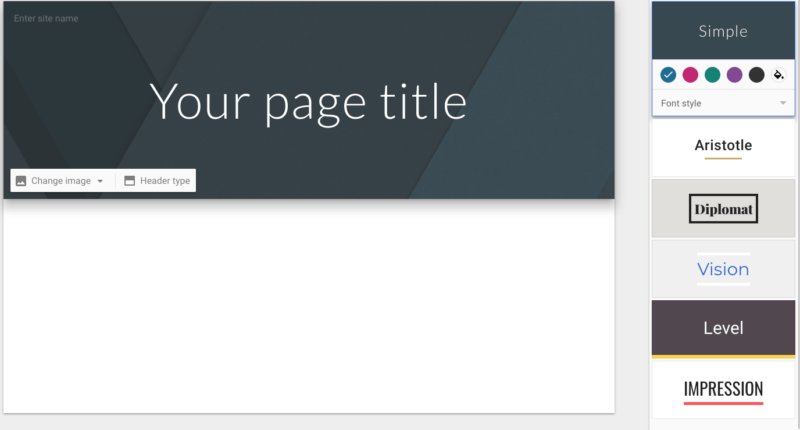
  • Google Sites — Google is free site builder that can host a custom domain and is a good choice for something simple like a wiki.

Hands-down the easiest way for most people to get a website up and running is a website builder, where you can drag-and-drop content blocks and tinker around with customizable templates. Most website builders are only free if you use a subdomain (for example, our URL on a Wix subdomain would look like: quicksprout.wix.com), which is a dealbreaker for anyone who wants to run a professional-looking site. I don’t like it one bit. I talk more about free hosting using a subdomain here.

What’s a custom domain? A custom domain is what switches your url from www.MyBrand.WebHost.com to www.MyBrand.com. If you’re serious about your business, you need to use a custom domain — free subdomains just scream, “I didn’t pay for this,” which is like putting up a flashing sign that says BUYER BEWARE.

I have great news, though. There are two builders that host websites for free and connect to a custom domain. They are super simple and have limited functionality — but since super simple, limited websites are the only ones I recommend hosting for free, that’s not really a problem. The two that meet this criteria are Ucraft and Google Sites.

If all you need is a super simple page — AKA the only kind of site that should run on a free host anyway — I recommend you try a free website builder that hosts custom domains, like Ucraft or Google Sites.

The Cons of Free Hosting

Like I mentioned above, I’m not going to dance around the fact that there are plenty of downsides to free web hosting. To make my recommendations for the best free host, which is definitely a title that’s relative to the niche, I took the following six criteria into consideration.

Ads

Some free web hosts stay afloat by selling ad space. We wanted to avoid those providers — no one wants random ads appearing in the middle of their content — and opted for hosts that support their free tier from sales of their paid hosting plans.

Email hosting

My recommendations offer at least one custom email address and free email hosting since that is one of the glaring things lacking from a free website builder. (Ucraft doesn’t offer email hosting at all and Google Sites only offers a custom email address if you pay $5/month for GSuite.) An email that’s attached to your website and domain name is great to have for one-off correspondences (plus looks pro on a business card), and a free web host provider’s email hosting is perfect for that.But be warned, your legit emails may be flagged as spam. Why? Free hosting is a hotbed for less-than-savory online activity, and your site might get lumped into a server of bad actors. In other words: spam filter activated. If you’re going to use your email a lot or for anything important — say for sending out a newsletter or for marketing promotions — we recommend upgrading to email hosting through a service like GSuite or even a domain registrar like Namecheap, which sells email hosting starting at $10/year.

Storage and bandwidth

Free web hosting has famously low limits for both disk space and bandwidth. If you go over your limit, your site may get suspended or you may be automatically upgraded to a paid service. Even when providers like Byethost offer unlimited bandwidth and storage, it’s not infinite. Just like with a paid service, unlimited storage and bandwidth only last until you start negatively impacting the other sites on your server — and all hosts are extremely vague about how much traffic or storage is too much traffic or storage. Have a negative impact and your site may still be suspended or auto-upgraded.

PHP and MySQL

PHP is one of the most popular programming languages. It’s what apps like WordPress, Joomla, and Drupal run on, and therefore what a lot of websites use. MySQL are databases those apps store information on. Your web host needs to support up-to-date versions of both. The problem: Most hosts don’t disclose the exact version of the PHP or MySQL they run. And even if these apps do work, there is a high likelihood that with any free host they are going to load slowly — a PHP application requires a lot more lift from what is probably an extremely burdened server. If you’re worried at all about page load time (and you should be — Google takes it into account), we recommend limiting anything you build on a free host to a simple static HTML/CSS site.

Another thing to keep in mind is database limitations. Every piece of software you want to use on your site requires a database to store its information. If you are running WordPress, it needs a database. If you’re running another app, it’s going to need its own database. Most free hosts impose a limit on the number of databases your site can access, and the amount of storage available in that database.

SSL certificate

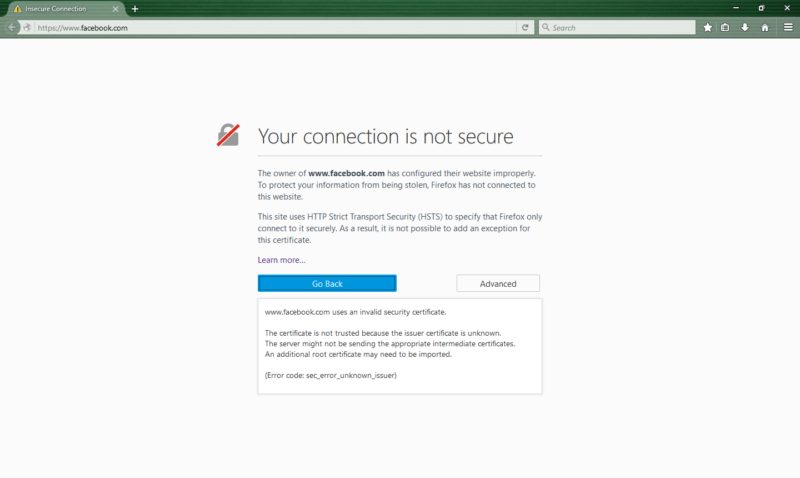
Secure Sockets Layer encryption is what confirms a website is secure enough to receive sensitive data like credit card data and passwords. SSL certificates are the only way a site can do any sort of ecommerce at all, but Google also considers it a factor for where any site, ecomm or not, shows up in search rankings. Most free web hosts don’t offer a free SSL certificate; the ones that do tend to offer a “self-signed” SSL. Self-signed SSLs are issued by servers, not by a certificate authority (Comodo, Digicert, Let’s Encrypt, etc). They offer the same level of encryption, but it’s not the standard version, so web browsers will still flag your site and issue a security warning to visitors.

An unsecure connection warning from Mozilla

Customer support

With any free host customer support is going to be limited, slow to respond, and not all that helpful. That’s just the way it is.

A note on custom domain names and domain privacy: You can host a site with a custom domain for free, but you’re still going to have to purchase the domain name through a domain registrar. Lots of hosting providers have a domain registration arm of their business, but you can also purchase a domain anywhere and connect it to your free web host. No matter what, we recommend also springing for domain privacy, which keeps your personal information (including your phone number and physical address) from being listed on the WHOIS public database. Opt-out, you’ll be spammed like crazy — at least for now. (Since the EU’s General Data Protection Regulation (GDPR) went into effect in May 2018, domain registrars are “refraining from publishing this information” to avoid liability. Others are retracting information to avoid accusations of selling information to spammers.)

The 5 Best Free Web Hosts

Awardspace

  • 1 site, 1GB storage, 5GB bandwidth
  • No ads
  • Domain registration
  • Limited customer support ticketing, live chat, online documentation

Awardspace is a big player in the free hosting space and has been around for more than a decade. It stands out for offering a full gig of storage, more than many others, and, according to a friendly sales rep we chatted with, up-to-date versions of PHP and MySQL. It also offers the Zacky drag-and-drop website builder, plus an easy-to-use WordPress and Joomla installer. Note: If your site receives no traffic for 12 months, it will automatically be set to inactive; after two more weeks of notices, it will be deleted.

More Awardspace specs

PHP 7.2, MySQL 5.7, 30MB database storage, 1 email account, no SSL

Atspace

  • 1 site, 1GB storage, unlimited bandwidth
  • No ads
  • Domain registration
  • Limited 24/7/365 customer support, live chat, limited ticketing, online documentation

Atspace has nearly identical stats to Awardspace, with the exception of unlimited bandwidth (as opposed to Awardspace’s 5GB) and a claim of 24/7/365 support. (Digging deeper, though, Atspace lists that support as “limited 24/7/365 support” so take that with a big fat grain of salt.) Atspace also uses the Zacky website builder and app installer for apps like WordPress and Joomla.

More Atspace specs

PHP 7.2, MySQL 5.7, 30MB database storage, 1 email account, no SSL

Freehostia

  • 5 sites, 250MB storage, 6MB bandwidth
  • No ads
  • Domain registration
  • 24/7 customer support with 1-hour ticket response and online documentation

Freehostia offers free cloud hosting on its Chocolate plan (your guess is as good as ours). That means it should be fast, but the Chocolate plan is also very small: only 250MB of disk space and 10MB of database storage. That said, it does include a free self-signed SSL certificate, a site builder with free templates, and the promise of a response to help tickets in under one hour — pretty much unheard of. If you have a small enough site, the customer service promise alone makes Freehostia a compelling pick.

More Freehostia specs

PHP 4 / 5 / 7, MySQL 5, 10MB database storage, 3 email accounts, self-signed SSL

Agilityhoster

  • 1 site, 1000MB storage, 5GB bandwidth
  • No ads
  • Domain registration
  • Limited ticketing, live chat, online documentation (24/7 customer support for system malfunctions only)

Agilityhoster’s free tier is slightly smaller than what’s offered from Awardspace and Atspace: only 1000MB of storage and one 20MB MySQL database. It also lacks any sort of website builder, although it does have a simple WordPress and Joomla installer to get you up and running quickly. A sales rep confirmed that it runs up-to-date PHP and MySQL.

More Agilityhoster specs

PHP 7.2, MySQL 5.7, 20MB database storage, 1 email account, no SSL

Byethost

  • Unlimited sites, storage, and bandwidth
  • No ads
  • Domain registration
  • 24/7 customer support and knowledge base

Byethost is by far the most generous free web host with unlimited sites, unlimited storage, unlimited bandwidth, and five email accounts. It also provides an automatic SSL on all domains, and includes a free site builder with templates. That said, Byethost is one of the least professional-looking hosts I looked at, with a poorly written website and enough vagueness that I wonder how unlimited its unlimited offerings actually are. Unless you think you need a lot of database space, I recommend going with a different free host.

More Byethost specs

PHP 5.4, 5.5, 5.6, 7.0; unlimited database storage; 5 email accounts; self-signed SSL

Free Hosting for Ecommerce Sites

Selling products through a website that’s hosted for free isn’t easy. I wouldn’t be able to sleep at night if I didn’t say this: if you’re serious about starting a business online, you need to run your ecommerce with Shopify. It’s the only contender in this space, and the subscription cost is well worth it.

Most free sites don’t support ecommerce, and when they do, the experience is pretty limited.

Strikingly

  • Sell 1 product on the free plan
  • Custom domain costs additonal $24.95/year

I was actually pretty surprised to find Strikingly, a website builder that also offers built-in ecommerce on its free plan.

The catch here is pretty big: You’ll be limited to selling one single product, and you’ll be limited to using a Strikingly.com subdomain. So, it’s ecommerce but it’s definitely no place to build an ecommerce business. If that’s what you’re doing, you should head over to our guides How to Create an Ecommerce Website in 9 Easy Steps and How to Start an Online Store That Drives Sales in 2019. You won’t regret it.

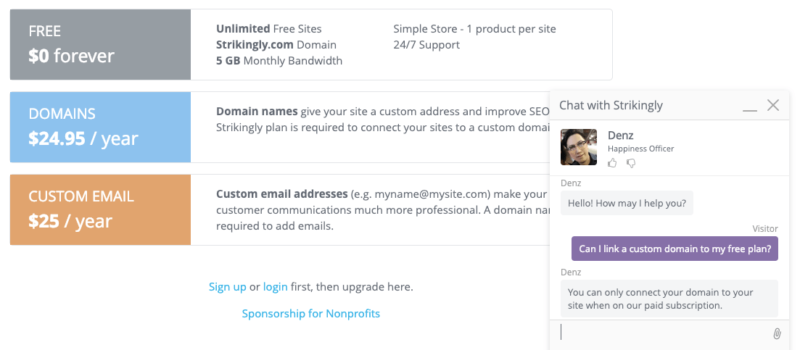
Strikingly free ecommerce support confirms you have to use a subdomain
I confirmed with Strikingly support that if you want a custom domain, you’ll be paying for a subscription.

Though selling only one product on a subdomain is super limiting, it’s very rare to find a free option that’ll let you sell anything at all. That’s why I included it at all. But, you already know how I feel about subdomains. (They are instant trust breakers for people who aren’t already convinced to buy from you.)

Free online stores are a little easier to come by. The difference? Online stores are just the stores, without the bells and whistles of a full-fledged website. That means no blog, no additional content — just products.

Square

  • Drag-and-drop editor, plus four customizable themes
  • Supports custom domain name
  • Transaction fee: 2.9% + $0.30

Square is a powerhouse business that was originally best known for its point-of-sell credit card swipers found at every farmers market and craft fair. Its free online store hosts unlimited products and has decent functionality.

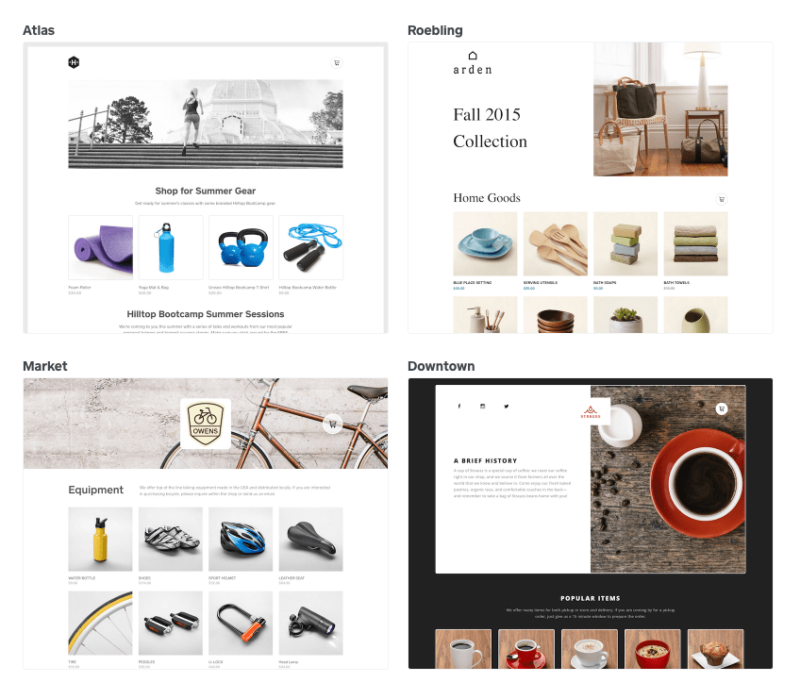
Square's free online store templates
Square offers four customizable templates for its free online stores.

Ecwid

  • 10 product limit
  • Start Site supports custom domain name
  • Transaction fee: Depends on payment provider (Ecwid supports 40 gateways)

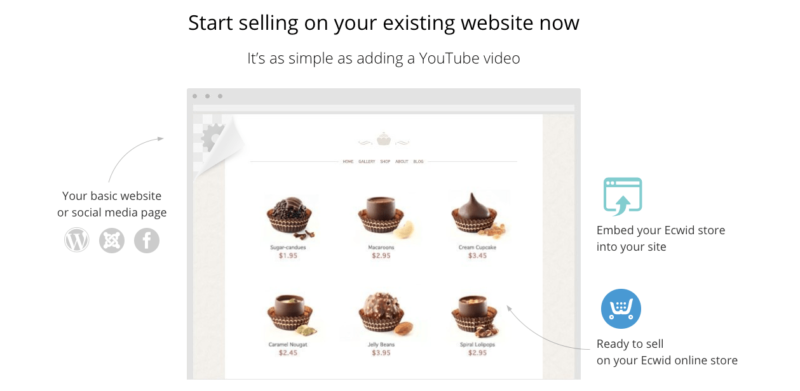
Ecwid is a really interesting option. While it offers a free online store like Square (Ecwid calls it a “Starter Site”), Ecwid also offers a free online store widget with code you can insert into pretty much any platform your site is on from Wix to WordPress to Tumblr just like you’d insert a YouTube video. That widget also means you sell simultaneously on multiple sites.

Image showing how you can embed an free Ecwid online store to any site.
You can add an Ecwid online store to any website for free.

The 2 Free Website Builders with Free Hosting

Design limitations are probably the biggest downside to using a free website builder. If the templates available on Ucraft and Google Sites aren’t what you’ve envisioned for your site, the next easiest free option is to find a free template you like and pair it with a free web host. I may be beating a dead horse, but the best web hosting services aren’t that expensive. We’re talking around $4/month for the initial contract. I think the price more than pays for itself in customer service, security, and speed.

Ucraft Review

  • Drag-and-drop builder, plus customizable templates (although you can’t update fonts)
  • Single page
  • Supports custom domain
  • Ucraft ad floats in bottom-right corner
  • Upgrade for unlimited pages, more customization, and no ads for $6/month
  • Ecommerce functionality starts at $14/month

Ucraft has a free plan for a single-page website that’s built with what it calls “elements.” An element is any individual piece of content: a title, a text block, a video, an image, an image gallery, a button. Ucraft’s free tier supports up to 50 basic elements, so that single-page website can hold a decent amount of content — just nothing too snazzy.

Some of the customizable templates available from Ucraft website builder.
Six of Ucraft’s 21 free templates, including a blank page for a completely customized site.

Ucraft's floating footer ad
A “Powered by UCRAFT” ad hovers in the bottom right corner of all free Ucraft websites.

Google Sites Review

  • Drag-and-drop builder, plus limited customizable themes
  • Unlimited storage
  • Supports custom domain
  • Google Sites ad in footer
  • Integrates with GMail
  • There are no upgrade options — this is everything

Google Sites is your other option for a super simple free site. And when I say “super simple,” I mean it. There are only six versions of the same template to choose from, and a limited number of layouts to work in. It’s super basic. In fact, lots of Google Sites are used for basic things like internal wikis.

The six themes available on Google Sites

Google Sites offers one basic template in six simple themes.

That said, Google Sites hosts as many pages as you want at no cost. It connects to your custom domain. It integrates with every other Google service, like Docs, Forms, and Slides. And it’s absurdly simple to use, especially if you’re used to working in Google products. If you already have a Google account, or are paying for GSuite for email hosting (which I wholeheartedly recommend), it’s a no-brainer.

Free Web Hosting Alternatives for Subdomain Sites

If you’re okay with a subdomain (as opposed to a custom domain) your options for free hosting increase. That’s because lots of great website builders offer freemium versions of their platforms when you use a subdomain — for example, our URL would be quicksprout.wordpress.com or quicksprout.wix.com.

Obviously, a subdomain lacks the professionalism of a custom domain, and free versions of any website builder product or platform tend to be pretty stripped down. But if you’re interested in launching content quickly, subdomains offer a really low barrier of entry. Most can launch in just a few minutes. Even better, if you envision a more robust web presence in the future, starting for free on the platform you ultimately want to use means you’ll have everything already built. You’ll just need to upgrade.

At the free level, these 3 are pretty comparable. They’ve all got an assortment of free templates or themes, an easy-to-use editor, limited storage, and ads for their service floating near the footer or in a bottom corner of the site. If you may eventually upgrade to a paid plan, check out our review of website builders. I go into a lot more detail than I do here.

Weebly

  • Drag-and-drop builder, plus templates
  • 500MB storage
  • Weebly.com subdomain (yoursite.weebly.com)
  • Displays Weebly ads
  • Upgrade for custom domain, no ads, and ecommerce functionality: starts at $8/month

The free version of Weebly includes ads and a Weebly subdomain. You’ll be limited to 500MB of storage, but will have the full drag-and-drop builder plus templates. You can always start with the free version and upgrade later, though Weebly’s ads are pretty obvious.

Wix

  • Drag-and-drop builder, plus templates
  • 500MB storage
  • 500MB bandwidth
  • Wix subdomain (username.wixsite.com/siteaddress)
  • Displays Wix ads
  • Upgrade for custom domain, no ads, and ecommerce functionality: starts at $11/month

Wix’s free plan is a lot like Weebly’s — you’ll get 500MB of storage and a drag-and-drop builder with templates. But you’ll subsidize your free plan with ads and one of the most eggregious subdomains out there, username.wixsite.com/siteaddress. You have the option to start for free and upgrade at a later time.

WordPress.com

  • Choose from free themes
  • 3GB storage
  • Unlimited bandwidth
  • WordPress.com subdomain (yoursite.wordpress.com)
  • Displays WordPress ads
  • Upgrade for custom domain and no ads: starts at $4/month

I love WordPress, but typically recommend people go with WordPress.org, the self-hosted version. The fully hosted version does have a free subdomain plan with free themes, but you’ll be using a subdomain and displaying WordPress ads. To get rid of those elements, it’ll be $4 a month, or about the price of some of the best web hosts. I think it’s better to go the self-hosted route at that point.

Best Free Web Hosting for Nonprofits and Educators

There are excellent — and extremely robust — free hosting options available for nonprofits and educators. These typically aren’t stripped-down versions, but full-blown shared hosting plans that are available for free, including custom domains, full technical functionality, and attentive customer support.

For nonprofits, I recommend DreamHost.

DreamHost offers one free Unlimited shared hosting plan (which includes email hosting) for 501(c)(3) organizations, plus a 35% discount on its suped-up DreamPress managed WordPress hosting. Both are killer deals.

DreamHost is a really big name in web hosting. It’s one of our top picks for best web hosts for small businesses and is one of three recommended hosts by WordPress itself. Most of the other free web hosts for nonprofits don’t have nearly as strong of reputations, nor offer as robust free plans. This plan has unlimited bandwidth, unlimited storage, and you can host an unlimited number of sites. Read more about the company in my Dreamhost web hosting review.

5 Other Free Web Hosts for Nonprofits to Consider

A Small Orange

Free month-to-month “Small Shared Plan” for businesses that pass A Small Orange’s “criteria.” You’ll get 50GB bandwidth, 5GB storage, and can host an unlimited number of sites.

InterServer.net

Free “Standard” web hosting for 501(c)(3) organizations, which includes unlimited bandwidth, unlimited storage, and unlimited sites.

Kualo

Free “Startup” shared hosting plan (plus free LiteSpeed caching add-on) for US-based charities that meet Kualo’s criteria. The plan comes with unlimited bandwidth, 30GB storage, and unlimited websites.

MightWeb

Free “Starter” shared hosting package to nonprofits in the US. This plan has unlimited bandwidth, but only 5GB storage and just 2 websites.

Weberser Web Hosting

This free non-profit hosting plan only includes 100GB bandwidth, 5GB storage, and 1 website.

Best Free Web Hosting for Educators

Some of our favorite web hosts provide free or deeply discounted services for teachers and university administrators.

SiteGround Hosting for Educators

  • 1 website
  • 10GB storage and unmetered bandwidth
  • SiteGround subdomain: yoursite.sgedu.sit

SiteGround, our pick for best web host, has some of the most robust shared hosting technology available — and arguably the best reputation in an industry of hundreds. SiteGround offers all the features and functionality of its StartUp Plan (including 24/7 support on chat, phone and ticket) to teachers for free with a SiteGround subdomain. SiteGround also discounts its hosting for students. Learn more about SiteGround plans and features in my SiteGround hosting review.

InMotion Hosting for Educators

  • 6 websites
  • Unlimited storage and bandwidth

InMotion Hosting, our pick for best web host for beginners and another standout in the world of shared hosting, gives its mid-tier Power plan to educators for free. Check out my InMotion hosting review for more info on the hosting company.

Weebly for Educators

  • Drag-and-drop editor, plus templates
  • Unlimited bandwidth and storage
  • Includes 40 student accounts

Weebly has a eductor-focused arm of its website builder business. It works just like Weebly for any small business or personal website, but is geared for educators. The edu-version of Weebly gives the option of publishing content to a custom domain, not a Weebly subdomain. It also skips all Weebly advertising.

If you like the sound of Weebly and a website builder, check out WordPress’s version, Edublogs. Similarly, it offers an ad-free environment with class and student management functionality, edu-focused plugins, and an Edublog subdomain.

Recap On Free Web Hosting

If you’re after free web hosting, you might really want the simplicity and ease of a free website builder. I’m impressed with both Ucraft and Google Sites which provide easy to use drag-and-drop templates and support custom domains. Yes, you’ll be limited in design and there will be some sort of “Powered by” ad in the footer on both. If those are deal-breakers, you probably do want web hosting.

Any free host will have similar drawbacks: limited storage and bandwidth, potential for spam-flagging email, and limited customer support. Go with Awardspace for more storage (1GB), Atspace for 24/7/365 help, or Freehostia if your site is really small (under 250MB).

If you’re an educator or nonprofit, you have a lot more — and better — options. SiteGround and InMotion Hosting, two of our very favorite web hosts, have excellent free plans for educators. So does website builder Weebly. And Dreamhost, another of our favorite web hosts, doesn’t charge nonprofits for one free Unlimited shared hosting plan.


Source Quick Sprout https://ift.tt/2PLkK16

FNBO Direct Bank Review – Competitive Savings Rates with a Top Notch Credit Card

First National Bank of Omaha is the official name, but the company goes by FNBO Direct Bank. The bank is a subsidiary of First National of Nebraska, which is a multistate holding company that’s headquartered in Omaha and has been around for at least 150 years. It is the largest privately-owned bank holding company in the United States. First national bank of omaha logo

With $20 billion in assets, the bank has locations in Nebraska, Colorado, Illinois, Iowa, Kansas, South Dakota, and Texas. The bank employs about 5,000 people.

It has a strong presence as an online savings bank, but one of its best-known products is its credit card, which offers generous bonus points and a host of other benefits. FNBO Direct Bank also has a large number of innovative online services, such as BillPay, person-to-person payments, Visa Checkout and integration with Apple Pay.

It’s a bank with a long history, while it sits on the cutting edge of 21st-century technology.

FNBO Direct Bank 

Available Accounts. Individual and joint checking accounts, savings accounts, certificates of deposit, and investment funds. No trusts or retirement accounts.

Customer Service. Customer service is available by both email and phone. Representatives are available 24 hours a day, seven days a week.

Mobile Banking. FNBO Direct Bank’s mobile app is available to all customers. You can use the app to pay your bills and transfer funds on the go, as well as to check account balances and search your transaction history. You can view all accounts from the app, including checking, savings, CDs and credit card accounts.

The app also offers mobile check deposits. You simply choose the account where you want to deposit the funds, enter the amount, take photos of both the front and back of the check, and submit it. It will show up in your account when the check clears. But you can also view images of previous mobile check deposits on the app.

The Mobile Banking app provides a secure login with your user ID and password, as well as your four-digit passcode and Touch ID. Account information is never stored on your phone, and data transmission is encrypted with the same secure technology as they use for online banking. The app is available on both Google Play and the App Store.

Apple Pay. FNBO Direct Bank has integrated its credit card with Apple Pay. You can make secure payments at hundreds of thousands of stores and participating apps. Apple Pay is available for iPhone 6, iPhone 6 Plus, iPad Air 2, iPad mini 3 (and later) or your Apple Watch paired with iPhone 5, iPhone 5c, iPhone 6, or iPhone 6 Plus.

Account Security. FBNO Direct Bank uses a multi-layered security system to minimize threats to your banking activities. This includes:

  • User ID and Password – Online account access is limited to those possessing the user ID and password associated with your account(s).
  • Encryption – Encryption technology protects data in transit between your computer and our systems. The closed lock icon indicates a communication session is encrypted.
  • Firewalls – Firewalls protect against unauthorized access to our systems.
  • Virus Protection – Anti-virus protection technology detects and prevents recognized viruses from entering our computer network.
  • Patching – Regular and consistent patching limits our systems’ vulnerabilities to cyber-attacks.
  • Timeout – Our online system is designed to log you out automatically after several minutes of inactivity.

FDIC Insurance. As an FDIC participating bank, FNBO Bank provides $250,000 coverage per depositor on all savings products.

FNBO Direct Bank PopMoney

This is FNBO Direct Bank’s person-to-person payments system. It offers a simple and convenient way to securely send and receive money using any of your accounts with the bank. With it, you can send payments either from your mobile device or by email, from your account with the bank.

All you need is the recipient’s phone number or email address, and you can send the payment.

FNBO Direct Bank Online Checking account

FNBO Direct Bank Online Checking is a high-yield online checking account. You need a minimum of $1 to open an account, and a minimum of $0.1 to earn the APY. This gets around the higher minimum balances that are typically charged by other online banks who also offer high-yield checking accounts.

The current interest rate and APY on the Online Checking Account: 0.65%.

The account has no monthly service charges, free incoming wires, and free stop payments. It also provides one overdraft forgiveness every 12 months.

Along with your checking account, you’ll also get a free FNBO Direct Visa Debit Card for all of your everyday purchases. The debit card comes with 24/7 worldwide access to over 2 million ATM locations. The bank does not charge fees on ATM withdrawals from other banks, although those banks or even the ATM operators may have their own fees.

The account also offers free debit card fraud monitoring, as well as free online banking, BillPay (see below), and free person-to-person payments with PopMoney.

BillPay

BillPay enables you to pay all of your monthly bills online. You can send payments to either an individual or a company that you do business with. You can even set up recurring payments so that you’ll never get another late penalty.

You can set up payments for loan accounts, utility bills, your rent or mortgage, your favorite charity, or even people who you do business with on a regular basis.

With BillPay, you never have to sit down and manually write out checks to make payments. You also save on postage, as well as a trip to the post office.

FNBO Direct Bank Online Savings Account

The FNBO Direct Bank Online Savings Account can be opened with as little as $1. And you only need $0.01 in order to earn the APY. There are no monthly fees or other charges associated with the savings account.

You can get access to your money anytime, with easy transfer options that enable you to send money to and from your accounts with ease and complete security. The FNBO Direct Bank Online Savings Account also comes with the PopMoney person-to-person payment system, which makes sending money fast and easy.

The current interest rate on the Online Savings Account: 1.14%, with a 1.15% APY

FNBO Direct Bank Savings Certificates of Deposit (CDs)

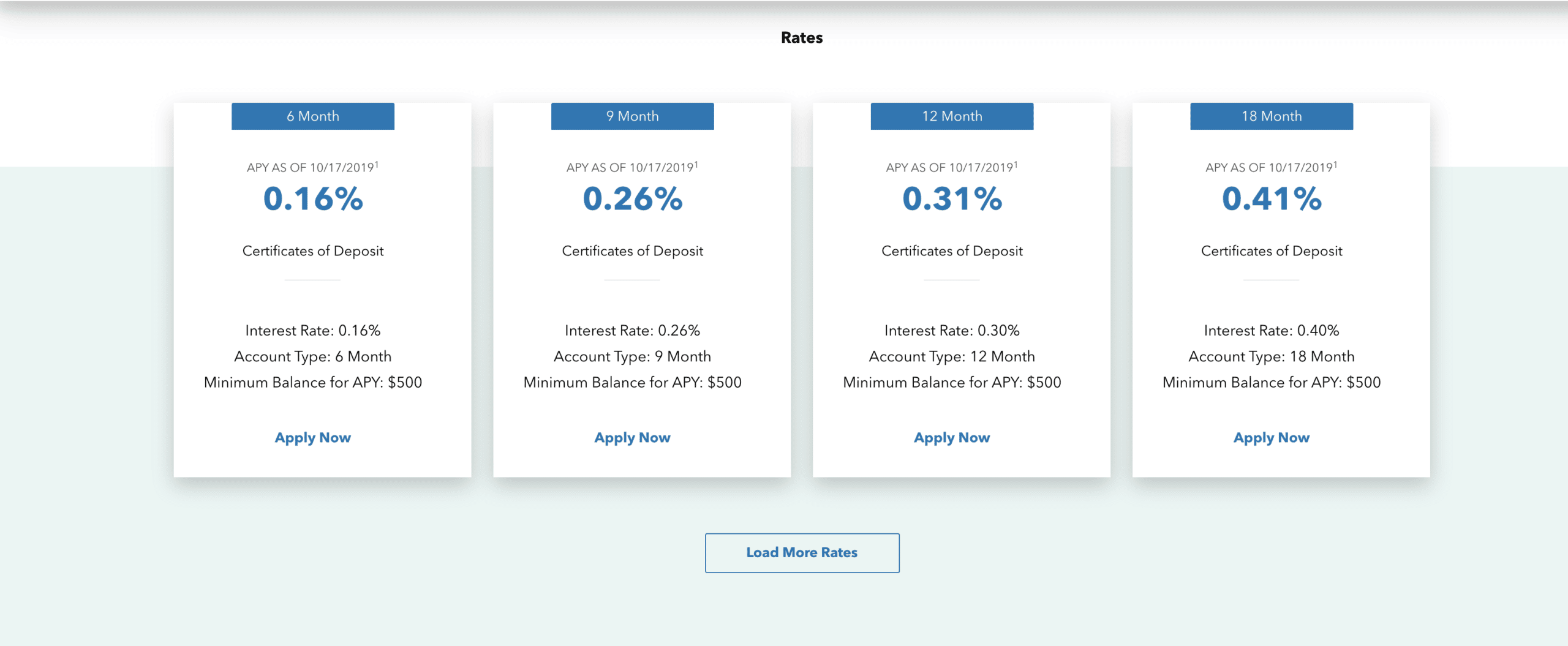
FNBO Direct Bank Certificates of Deposit require a minimum deposit of $500 for all certificates and are available in terms ranging from six months to 60 months. All feature guaranteed earnings and automatic renewals, though you always have the option to withdraw all of the funds in your CD at the time of maturity.

Interest on FNBO Direct Bank CDs is compounded daily and credited quarterly. Even if you close your account before the interest is credited, you will still receive the accrued interest up to the date of closure.

FNBO Direct Bank CDs will automatically renew at the time of maturity. But you will have 10 calendar days after the maturity date to withdraw funds from a CD, or completely close it out. There will be no penalty for the withdrawal or closure as long as it happens within the 10-day time limit.

The certificate will not automatically renew if either you withdraw funds on the maturity date, or if you provide written notice that you do not want to renew on or before the maturity date.

Prepayment Penalties on CDs

Like virtually every other bank, FNBO Direct Bank has penalties for early withdrawals on its CDs. Penalties are as follows:

  • Terms of 0-3 months are penalized all interest earned if withdrawn early (minimum of 7 days)
  • Terms over 3 months up to 1 year are penalized 3 months of interest
  • Terms over 1 year are penalized 6 months of interest.

FNBO Tributary Funds

This is a unique product offering by FNBO Direct Bank, given that very few online savings banks offer non-bank investment products.

FNBO Direct Bank offers investments through its Tributary Funds affiliate, which is a family of mutual funds advised by Tributary Capital Management (also owned by First National Bank). Each fund is managed with a unique investment strategy that allows you to customize your portfolio to match your risk tolerance, time horizon, and investment goals.

You can invest in Tributary Funds by visiting the Tributary Funds website and opening an account, or through a First National Advisor, either through the Investments & Planning or Wealth Management tabs on the site. You can also invest in the funds through an investment brokerage account, such as TD Ameritrade, Charles Schwab, Pershing or Fidelity.

Tributary Funds offer the following benefits:

  • 6 different mutual funds to try and help you diversify your portfolio and work toward reaching your goals.
  • Low initial account minimums of $1000.
  • Simplification through automatic investment options – for as little as $50 a month.
  • Ownership by a family-owned institution that has been in the community for over 150 years.
  • Freedom to create a portfolio tailored to your financial objectives, timetable, and investment risk preference.

The six different mutual funds include the following:

FNBO Direct Bank ExtraEarnings Visa Card

The FNBO Direct Bank ExtraEarnings Visa Card is one of the Bank’s most competitive products. It comes with an attractive interest rate of 12.99% APR. The card uses Chip technology, to give you an added layer of security. In addition, FNBO Direct Bank has partnered with FICO to provide its cardmembers with their FICO score for free.

The card also comes with no annual fee, but you must have an FNBO Direct Bank checking or savings account in order to qualify for the card.

The card comes with Zero Liability protection, which means that you will not be liable for unauthorized transactions. It also comes with Fraud Monitoring, which means that your account will be monitored by the Bank, 24 hours a day, seven days a week, 365 days a year. If they suspect fraudulent activity on your card, you will be notified immediately.

The FNBO Direct Bank ExtraEarnings Visa Card also offers a generous reward points benefit. The rewards points offer looks like this:

  • Earn 2 points (1 point and 1 bonus point) for every $1 in qualifying purchases for the first 12 billing cycles after your account is opened.
  • Continue to earn 1 point for every $1 in qualifying purchases after the first 12 billing cycles.
  • Redeem your points by requesting a $25 deposit into your FNBO Direct Online Savings Account or Checking Account each time you accrue 2,500 points on your account.

Visa Checkout

Visa Checkout comes with your FNBO Direct Bank ExtraEarnings Visa Card. It offers a simple, fast and secure way to navigate the online checkout process. It provides you with the ability to pay with a single login from any mobile device. You can also guard your data behind multiple layers of security.

And while you are making your purchases using Visa Checkout, you continue earning the rewards points provided by the FNBO Direct Bank ExtraEarnings Visa Card.

You can enroll in Visa Checkout with your FNBO Direct Visa card, then never have to re-enter your card or address information as long as you pay where you see Visa Checkout.

How to Open an Account with FNBO Direct Bank

To open an account with FNBO Direct Bank, you can apply online, and the entire process takes about 10 to 15 minutes. You must be a US resident, and at least 18 years old.

The following information will be required:

  • Your Social Security or Tax ID number.
  • Your Driver’s License or ID card issued by a State DMV.
  • Employment Information including employer name, address, and phone.
  • Information about any loans or mortgages you may have to help confirm your identity.
  • To fund your account electronically, you will need your current bank account and routing numbers. You must use an account that allows electronic deposits and withdrawals.

You complete a brief application, confirm your identity, complete a signature card, customize your account, fund your account, then you’re on your way.

FNBO Direct Bank Pros and Cons

FNBO Direct Bank Pros

  • Interest paid on checking and savings accounts and CDs are competitive with other online banks. They’re also much higher than anything that is available from typical local banks.
  • FNBO Direct Bank offers a wide range of online payment methods, including BillPay, PopMoney person-to-person payments, Visa Checkout and Apple Pay. The combination of services makes the entire banking platform even faster and easier.
  • FNBO Direct Bank ExtraEarnings Visa Card offers generous rewards points, along with a very competitive interest rate and no annual fee.
  • Tributary Funds make FNBO Direct Bank one of the few online banks that offer investment funds, in addition to high yield savings products.
  • Customer service – FNBO Direct Bank representatives are available 24 hours a day, seven days a week. This is in direct contrast to the many banks that are only available during regular business hours.

FNBO Direct Bank Cons

  • Limited account availability – FNBO Direct Bank offers checking and savings accounts, as well as CDs and investments. But they don’t offer other types of accounts, such as retirement accounts or trust accounts.
  • Interest rates paid on shorter-term CDs are not competitive with other online banks.

Should You Use FNBO Direct Bank?

FNBO Direct Bank pays interest on checking, savings and certificates of deposit that are competitive with other online banks, and well above local banks. But this Bank offers other services that aren’t available with other online banks. These include investment funds and a very attractive credit card offer, complete with plenty of rewards points.

The Online Banking and Mobile Banking platforms have the kinds of features that you should expect to have with similar platforms but don’t often find with competitors. The combination of BillPay, PopMoney person-to-person payments, Apply Pay and Visa Checkout put FNBO Direct Bank’s savings products on the cutting edge of the online and mobile banking universes.

If you’d like to learn more, or you’re interested in signing up for their savings products or the credit card, visit the FNBO Direct Bank website and see all that they have to offer.

The post FNBO Direct Bank Review – Competitive Savings Rates with a Top Notch Credit Card appeared first on Good Financial Cents®.


Source Good Financial Cents® https://ift.tt/2NfwZQD

E-burg South students serve up a java jolt

EAST STROUDSBURG — The CORE Café celebrated its grand opening on Monday, and with it, this little coffee shop around the corner is bringing more than just the morning joe in a mission to brew success for all.Students, staff, local politicians and community members came together at East Stroudsburg Senior High School South on Monday to cut the ribbon on the school’s newest student-run venture.“We’re here today for the opening of The CORE Café, [...]

Source Business - poconorecord.com https://ift.tt/32iZfGq